Customers
Enjoy your normal daily activities
  • Shower proof (IP44/IP57)
  • No recharge, No replace electrodes
  • Allows for light exercise (e.g., walking, jogging)
  • Single-use medical device (Class II) ∙ Single lead
  • Ultra-small ∙ Ultra-light ECG patch
  • ECG monitoring duration selectable (7 or 14 days)
ECG
Patch
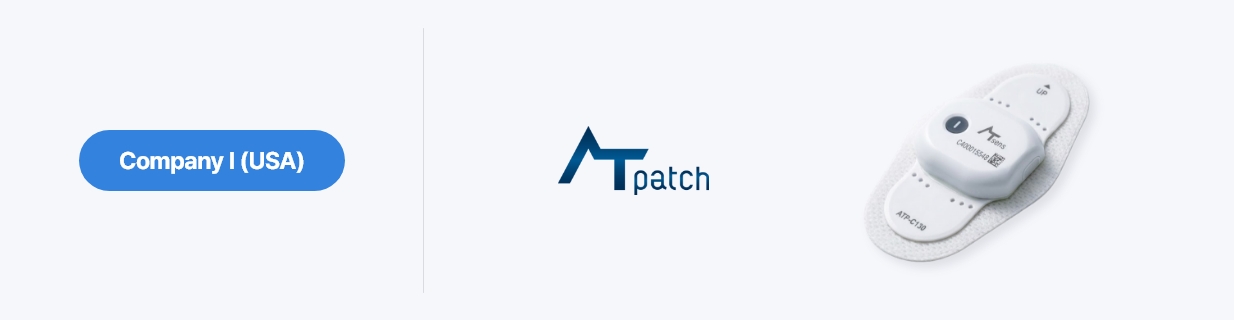
AT-Patch is a patch-type wearable medical device designed to support continuous ECG monitoring for up to 14 days, depending on the cleared model and market.
  • Securing a competitive edge through a minimal, lightweight design and long-term continuous monitoring.
  • Optimized performance through the seamless integration of hardware, software, and analytical algorithms.
AI Algorithm

Proprietary AI algorithms protected by multiple domestic and international patents.
Technology developed to support ECG data review, with regulatory status and clinical evidence varying by market.

AT-Patch software was classified as Enhanced level
in the FDA Level of Concern (LOC) assessment

  • AT-Report (PC Program)

    AI-based ECG data analysis support software

  • AT-Report (Hard Copy)

    Reports combine AI analysis outputs with clinician review workflows

AI-Powered ECG Analysis

4-step AI Analysis Pipeline for Arrhythmia Detection

  • Step 1
    CAPTURE

    High-sensitivity
    Sensors acquire electrical
    in the heart

  • Step 2
    ANALYZE

    Specialized AI algorithms
    analyze the ECG
    waveform

  • Step 3
    DETECT

    Detects arrhythmia
    in real-time and
    assesses risk

  • Step 4
    REPORT

    Generates clear
    analysis reports

    for healthcare providers and users

AT-Note
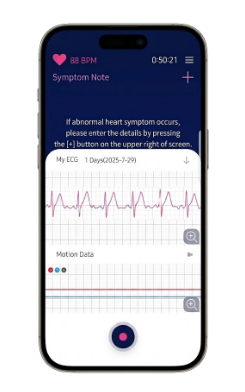
  • Live ECG viewer via Bluetooth
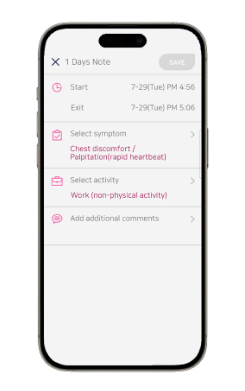
  • Easy to record your symptoms
Various ECG monitoring durations offered
Model ATP-C70 ATP-C130
Monitoring Duration Up to 7 days Up to 14 days
Type Disposable, Single lead (Lead II)
Medical device Classification Class II
Size Body 32.6 x 39.6 x 7.7 mm
Patch 74 x 47.1 x 8.4 mm
Body 31 x 39 x 7.8 mm
Patch 84 x 48.8 x 8.5 mm
Weight 13g 13g
Ingress Protection IP44 IP57
Certificate FDA, PMDA, CE MDR, MFDS, MHRA
Memory Internal memory
Supported OS Android, iOS
Power/Voltage Internal Battery, DC 3V
(Li/MnO2, Type CR2032)

Performance optimization through the combination of HW, SW, and analysis algorithms
How to use AT-Patch

Before you begin

Available models, app requirements, wear duration, and return arrangements vary by country and healthcare provider. Follow the manual supplied with your device and your healthcare provider's instructions. This page describes a general workflow, not instructions for every model.

Your monitoring journey

  1. 01 Prepare and apply

    Follow your healthcare provider's instructions for your model. Confirm placement, any required app connection, and the start of recording using the procedure you have been given.

  2. 02 Daily activities and symptoms

    Follow your model's precautions for exercise and water exposure. Record the time and details of symptoms as instructed, using the device button, AT-Note, or a paper diary depending on your model and service.

  3. 03 Complete and return

    Wear the device for the prescribed period unless instructed otherwise. Follow your provider's directions for removal, return, and submission of symptom records.

  4. 04 ECG data analysis

    Your healthcare provider or designated analysis service reviews and processes the recorded data according to its established procedure.

  5. 05 Discuss your results

    A healthcare professional explains the findings and next steps. App displays and automated analysis do not replace clinical judgment.

Video guide

Previously published guide from 2023. Models, apps, and procedures shown may differ from your current product. Check your model's manual and your healthcare provider's instructions first.

English · 2023

Frequently asked questions

Guidance on the AT-Heart monitoring journey and supporting documents.

24 questions

What is AT-Patch used for?

AT-Patch records ECG data during the prescribed monitoring period to support a healthcare professional's review of your heart rhythm. Ask your healthcare provider which examination and monitoring period are appropriate for you.

How do I obtain AT-Patch?

Contact a healthcare provider or your local supplier to ask about availability and the procedure in your country. Available models and access arrangements vary by market.

Can I apply the device myself?

Follow the instructions provided for placement, preparation, and confirmation that recording has started. Contact your healthcare provider if you have not received sufficient guidance or are unsure whether recording has begun.

What if I have sensitive or damaged skin?

Tell your healthcare provider about skin allergies, rashes, wounds, or skin conditions before application. Your device manual includes skin-related contraindications and precautions; do not use this FAQ alone to decide whether the device is suitable for you.

User manuals
What if I have an implanted device?

Tell your healthcare provider if you have a pacemaker, implanted defibrillator, or another implanted electrical device. A healthcare professional must check your implanted device and AT-Patch model before advising whether and how monitoring can proceed.

What if another examination is scheduled?

Tell the examination team that you are wearing AT-Patch when booking and before the examination. Procedures involving strong electromagnetic fields, particularly MRI, have device-specific restrictions. Check with the team before entering the examination area, including any instructions for removal and resuming monitoring.

Can I shower, bathe, or swim?

Follow the water-exposure instructions and ingress protection requirements for your model. Permission to shower does not mean that prolonged immersion, such as bathing or swimming, is permitted. Check your device's instructions before monitoring begins.

User manuals
Can I exercise or continue daily activities?

Continue daily activities within the limits advised by your healthcare provider and follow precautions about excessive movement and sweating. Ask your provider about suitable exercise intensity for your health condition.

Should I keep it on while sleeping?

Follow the continuous-wear instructions provided for your monitoring period. Do not remove and reattach the device just for sleeping. Contact your healthcare provider if pressure or skin discomfort makes it difficult to wear.

What if my skin becomes irritated?

Seek medical advice if you develop a rash, allergic reaction, skin irritation, or itching. Do not simply tolerate the symptoms or apply medication on your own; ask your healthcare provider whether monitoring should stop and the device should be removed.

What if the patch loosens or falls off?

If the device comes off completely, do not reattach it yourself; contact your healthcare provider. If only an edge lifts, check your model's supplementary attachment instructions before using any adhesive or tape.

What if it is soaked or damaged?

Contact your healthcare provider if the device has been immersed, damaged, or may not be working correctly. Do not disassemble or repair it yourself. Ask whether to continue monitoring, remove the device, or arrange a replacement.

How do I record symptoms?

Record the time and details using the method explained by your care team. Depending on your model and care arrangement, this may involve the device button, AT-Note, or a paper symptom diary. Check your model's instructions for button operation and indicator lights.

Should I wait after recording severe symptoms?

If palpitations occur with chest pain, shortness of breath, fainting, or feeling faint, seek immediate help from local emergency services. Do not wait for a response to a symptom entry or website enquiry. Recording symptoms does not mean an emergency response has been initiated.

What if I cannot use a smartphone?

Some care arrangements allow a paper symptom diary. However, app requirements for initial setup and starting recording vary by model. Ask your healthcare provider in advance whether your monitoring can proceed without a smartphone.

Does a lost app connection mean recording stopped?

Do not infer the recording status from the app connection alone. Check the on-screen instructions and contact your healthcare provider or designated technical support if the status is unclear or the connection cannot be restored.

What do a light, sound, or suspected stop mean?

Indicator lights and sounds depend on the model and operating stage. Check the relevant manual and tell your healthcare provider about unexpected changes or a suspected stop. Do not repeatedly hold the button or try unapproved operations.

User manuals
Do I need to charge it or replace the battery?

AT-Patch is an integrated device designed for the prescribed monitoring period. Do not attempt to charge it or replace the battery yourself. Contact your healthcare provider if operating problems occur before the expected end of monitoring.

How long should I wear it?

The monitoring period depends on your model and prescription. Do not end monitoring on your own because you have no symptoms or the app appears normal. Discuss any need to stop with your healthcare provider.

How should I remove the device?

Follow your healthcare provider's timing and the removal instructions for your model. If you have not received removal instructions or have a skin problem, contact your healthcare provider first.

User manuals
Where and how do I return it?

Return the device and required symptom records as instructed by your healthcare provider or designated return service. Delivery, packaging, and required records vary by country and provider. Do not discard the device before receiving return and data-handling instructions.

When and how will I receive my results?

Ask the healthcare provider who arranged the examination about timing and how results will be delivered. A healthcare professional reviews the recording and analysis before explaining the findings and next steps. Turnaround times vary.

Can I diagnose myself from the app or report?

Do not diagnose a condition or change treatment based only on the app display or automated analysis. AT-Report supports review by healthcare professionals. Discuss your results with your healthcare provider.

Can I reuse it, and where is the correct manual?

Do not reuse a single-use device or use it on another person. Select a manual that matches the device model, document market, and language. If no matching document is listed, ask your healthcare provider or local supplier.

User manuals